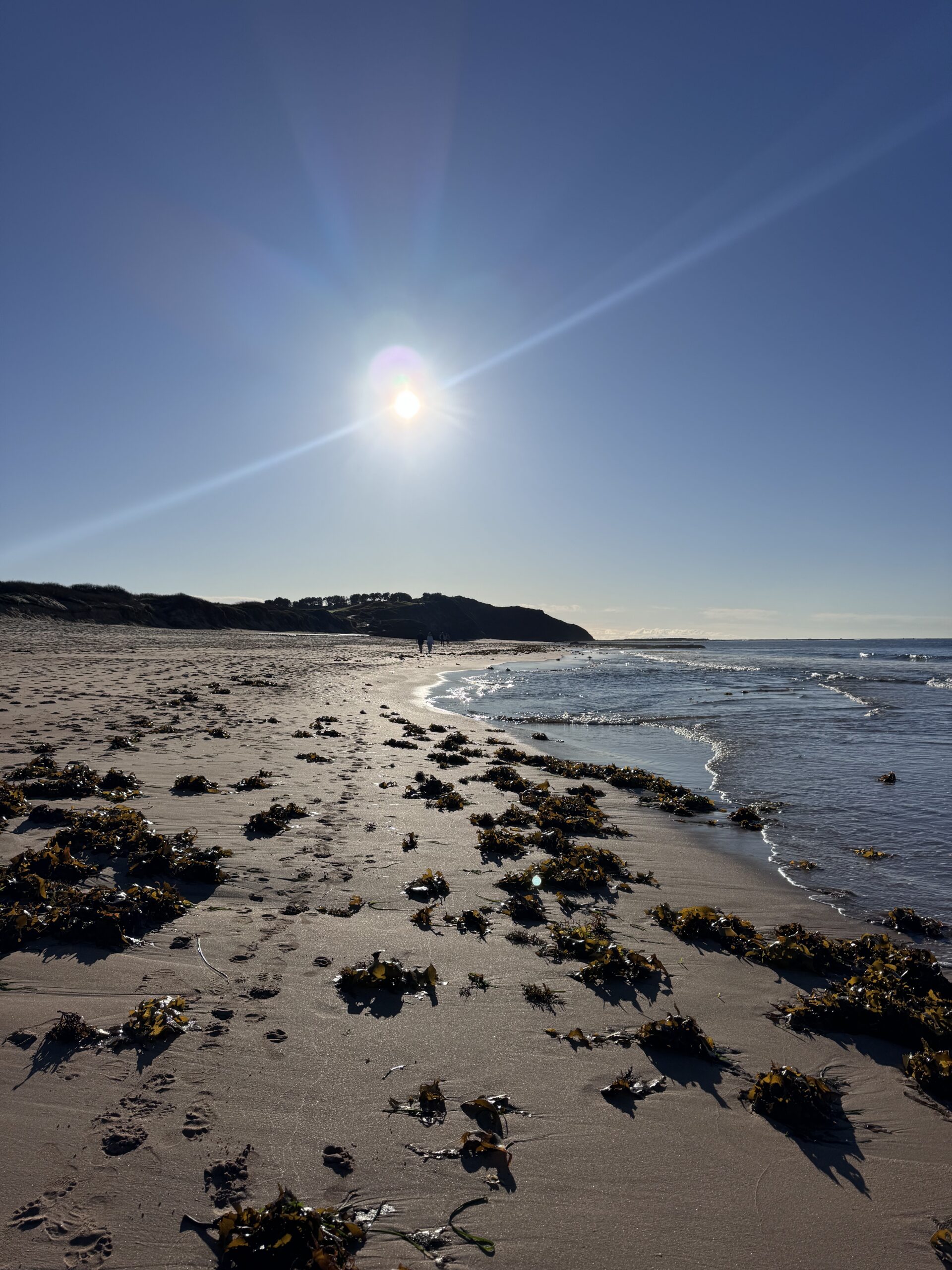
Before dawn, when the air smells faintly of salt and eucalyptus, smartphone photography lets you step from the car, pocket a camera, and start composing before the first magpie calls. On Sydney’s Northern Beaches, pros and beginners alike are capturing gallery-worthy frames from the same device they use to text their mates. This isn’t a novelty. It’s a shift in how we see, plan and publish images—proving the iPhone and its peers are, in every meaningful way, real cameras. Below, we rank the 10 breakthroughs that made it happen, with practical tips for coastal light, safe morning shoots, and creative wins you can try on your next photo walk.
Why smartphone photography is a real camera movement
Phone cameras today pair fast lenses, large sensors (by phone standards) and computational imaging that rivals dedicated gear in everyday conditions. More importantly, they remove friction. You shoot, cull, grade and share in minutes. In Australia’s changeable coastal weather, that immediacy matters. Moreover, optical image stabilisation, RAW capture, and multi-frame HDR now deliver detail and tonal range once reserved for bigger kits. Consequently, the debate has shifted from “can a phone do it?” to “what story will you tell?”
How to read this list
We count down from good to great—10 to 1—spotlighting the innovations and habits that empower creators. Each pick includes practical settings, coastal pointers, and a reason it matters for both amateurs and working shooters. You’ll also find links to authoritative Australian resources for safety and planning.
10. Pocket readiness: the camera you’ll actually carry
Why it matters: The best camera is the one that’s with you when the tide turns glassy or a squall opens a rainbow over the headland. Phones win because they remove excuses and weight.
How it empowers: You can scout compositions on a lunch break, test angles the day before a sunrise, and respond to fleeting conditions—like backlit sea spray—without unpacking a bag. That builds consistency, which builds skill.
Practical coastal tips
- Enable “Open Camera with Volume Button” (iPhone: use Volume Up as Shutter). Faster access means fewer missed moments.
- Keep a microfibre cloth in your pocket. Salt spray softens images quickly.
- Use a slim waterproof pouch in your jacket for drizzle and ocean pool splashes.
Quick settings
- Turn on grid lines for composition.
- Use Live Photos or Motion Photo to capture micro-moments around the tap.
9. Ultra-wide vision: storytelling beyond the frame
Why it matters: The ultra-wide lens reframes familiar coastlines—rock shelves, tidal pools, cliff lines—into sweeping stories. It exaggerates foreground texture, pulling viewers into the scene.
How it empowers: Beginners can craft pro-level depth using lead-in lines and foreground interest, while pros get an expressive tool that travels light.
Coastal composition ideas
- Place textured sandstone or wet pebbles in the bottom third; let lines draw the eye to the horizon.
- At sunrise, angle slightly down to reduce flare and capture reflections in thin water sheets.
Suggested settings
- Tilt meter level to avoid warped horizons.
- Tap to expose for the highlights near the sun, then nudge exposure down for richer colour.
8. Night and low light modes: painting with photons
Why it matters: Multi-frame stacking and noise reduction turn barely-there light into clean frames. Pre-dawn blues, city glow over Manly, or a dim rock pool walkway now become viable subjects.
How it empowers: You can practice long-exposure logic—stability, timing, highlight control—without carrying a tripod. Pros gain publishable ambient frames between commercial shoots.
Field craft
- Brace against a railing or rock. Keep elbows tucked. Count the exposure seconds softly to stay still.
- Avoid waves lapping at your feet in the dark. Assess tide times before you step onto rock platforms.
Suggested settings
- Use Night mode with the shortest exposure that looks clean to prevent star trailing and motion blur.
- Slightly underexpose to protect highlight bulbs or shoreline lights, then lift shadows in edit.
7. Smart HDR and computational tone: dynamic range for coastal contrast
Why it matters: Sunrise at the beach is a brutal test—bright sky, dark foreground. Smart HDR balances that contrast, layering detail into both ends of the histogram.
How it empowers: Amateurs get straight-out-of-camera shots with sky texture and foreground clarity. Pros can expose for highlights, then recover mid-tones without crunchy shadows.
Coastal technique
- Tap the brightest sky area and drag exposure down a notch. Let Smart HDR lift the rest.
- Frame with a darker foreground subject—a railing, rock, or figure—to anchor the tonal curve.
Suggested settings
- Keep Smart HDR on for backlit scenes.
- Use Photographic Styles or Picture Profiles with a flatter contrast for more edit latitude.
6. RAW and ProRAW capture: latitude for serious editors
Why it matters: RAW files preserve sensor data and subtle colour, letting you push exposure, white balance and local contrast with confidence. On iPhone, ProRAW blends computational gains with RAW flexibility.
How it empowers: Beginners learn the language of light in post. Professionals gain a mobile-first workflow that meets client expectations for quality, especially for editorial and social deliverables.
Editing workflow
- Shoot ProRAW for tricky light; export as 16-bit TIFF if printing larger than A3.
- In your editor, first set white balance, then adjust exposure, then texture/clarity last.
Suggested settings
- Enable ProRAW at your highest-resolution option.
- Keep ISO low by tapping darker mid-tones and slightly underexposing.
5. Macro and close focus: small worlds by the sea
Why it matters: Macro-capable lenses on phones reveal salt crystals on driftwood, bubbles on a rock shelf and delicate lichen patterns. These details make compelling stories when the sky disappoints.
How it empowers: With zero extra kit, you can pivot your shoot plan. Meanwhile, pros can gather textural B-roll that ties a series together.
Coastal composition
- Look for repeating patterns: ripple marks, algae, shell spirals.
- Use your body as a flag against wind to steady the phone.
Suggested settings
- Turn on macro control and move in slowly; watch for focus breathing.
- Drop exposure slightly to deepen colour and avoid specular highlight blowouts.
4. Optical stabilisation and action modes: steady as you go
Why it matters: Optical stabilisation, sensor-shift tech and action modes tame hand shake and small knocks. On coastal headlands where wind gusts and uneven rock faces are your norm, stability is everything.
How it empowers: Amateurs gain sharper shots at slower shutter equivalents. Professionals nail reliable handheld footage and stills for mixed-media briefs.
Stability hacks
- Lean into a fence post, squeeze the phone gently, and exhale during the tap.
- Plant feet wide on dry, non-slippery surfaces; never chase a wave for a shot.
Suggested settings
- Enable action mode for quick clips of waves without jitter.
- For stills, fire a short burst; choose the sharpest frame later.
3. On-device editing and colour science: from capture to share
Why it matters: Phones let you grade with nuanced colour science on the spot. That immediacy turns a morning walk into a finished series before coffee has cooled.
How it empowers: Beginners learn visual language through quick feedback loops. Pros deliver timely updates to clients or audiences while conditions are still relevant.
Editing approach
- Start with white balance—coastal dawn often skews cool. Warm slightly, then adjust contrast.
- Use selective edits: lift shadows in rocks, reduce highlights near the sun, add a soft vignette.
Suggested settings
- Keep sharpening modest to avoid halos on high-contrast edges like cliff lines.
- Export web versions at native resolution for social; archive RAWs to cloud.
2. Telephoto reach and portrait modes: compressed drama
Why it matters: Tele lenses on smartphones bring distant headlands closer and compress space, enhancing drama at sunrise and isolating subjects against glowing water.
How it empowers: Amateurs can experiment with visual sequencing—wide scene, medium detail, tight tele—while pros create editorial-ready portraits and detail shots in minutes.
Coastal storytelling
- Frame surfers as silhouettes against backlit spray for graphic impact.
- Use portrait mode for candid headshots with soft background bokeh near ocean pools.
Suggested settings
- Choose the longest optical focal length available; avoid digital zoom when detail matters.
- Tap for face focus; reduce portrait blur slightly for a natural look.
1. The ecosystem: capture, plan, protect and arrive
Why it matters: The single biggest reason smartphone photography is a real camera movement is the ecosystem: weather apps, tide charts, safety alerts, editing suites, cloud backups and fast transport to the location. A camera is not only a sensor and lens; it’s the system that surrounds it.
How it empowers: With your phone, you research sunrise angles, check swell height, book a car, navigate, shoot, edit, caption, and publish—all before the light hardens. That integrated flow is what many professionals actually pay for: reliability and speed.
Planning toolkit
- Check sunrise and civil twilight to know when the rocks will glow without harsh contrast.
- Confirm tide and swell before stepping onto platforms. High surge and wet algae are hazards.
- Skim weather warnings, then plan a wind-sheltered angle behind a headland.
Useful Australian resources
- Bureau of Meteorology Marine & Tides for swell, wind and tide guidance.
- Safe Work Australia: Sun Safety for UV protection basics during long shoots.
- NSW National Parks Safety for track conditions and coastal walking advice.
Field checklist: coastal smartphone shoot
- Clean lens, grid on, RAW or ProRAW enabled when needed.
- Microfibre cloth, small towel, and a light windbreaker.
- Battery above 40% (cold air drains faster); carry a slim power bank.
- Non-slip shoes; avoid dark, wet algae on rocks; keep an eye on sets of larger waves.
- Plan exit routes; tell someone your intended return time before pre-dawn starts.
Composition playbook for morning coastal light
Rule of thirds with intent
Place the horizon on the lower third only when the sky performs. Otherwise, lift it to give textured rocks or tidal pools space to breathe.
Leading lines and layers
Use sandstone striations or pool edges as arrows. Layer fore-mid-back: rock detail, wave line, headland silhouette. This adds dimension even in flat light.
Reflections and negative space
After waves recede, a thin sheen becomes a mirror. Step left or right to align reflections with the sun path, then leave sky area clean for negative space.
Exposure tips that make phones feel pro
Expose for highlights, fill shadows later
Coastal light punishes blown skies. Tap bright sky near the sun and drag exposure down. Shadows in wet rock will lift beautifully in edit.
Use focus lock
Tap-and-hold for AE/AF lock on critical textures—foam lines, faces, or shell patterns—then recompose. It prevents the camera from hunting mid-shot.
Manage flare the clever way
Block the sun with a headland edge or a subject’s shoulder, then shift slightly to create a clean sunstar. Wipe the lens often; salt flare is sneaky.
Creative prompts for surprising frames
Slow water without a tripod
Brace your phone and use Night mode’s shortest multi-second option to blur a wave scroll. Time it as the foam runs back for silky leading lines.
Minimal silhouettes
Find a clean horizon and a single subject—a fisher, a jogger, a bollard. Underexpose to graphic blacks against pastel dawn.
Abstract textures
Fill the frame with rock pools, rust stains, or bubbled foam. Rotate the phone and test all four orientations. Abstracts thrive on experimentation.
Safety, etiquette and caring for the coast
Respect the sea and fellow walkers. Keep distance from fisherfolk casting lines. Avoid stepping on rock pool life. Moreover, scrutinise swell and tide; rogue sets happen.
- Never turn your back to the ocean on exposed platforms.
- Pack out rubbish, including lens wipes and snack wrappers.
- If photographing wildlife, stay back and limit time near nests and roosts.
Smartphone photography on assignment: pro-grade workflows
Commercial photographers now mix phone stills with video for agile storytelling. A sunrise social teaser can precede the main gallery, keeping clients engaged.
Workflow ideas
- Capture ProRAW wide establishing frames, tele portraits of artisans or athletes, then 10-second action clips in action mode.
- Grade with a consistent look and publish a cohesive set to the client deck and social platforms before midday.
File handling
- Back up to cloud immediately; tag location and keywords while memory is fresh.
- Export a small web set and a high-res archive. Keep both in labelled albums per location and light condition.
Lens discipline for phones: think like a prime shooter
Even with multiple lenses, approach each focal length like a prime. Don’t zoom casually. Walk, kneel, climb a step. You’ll strengthen composition instincts.
Focal length exercises
- Ultra-wide only: 10 frames of foreground texture leading to horizon.
- Main wide: 10 frames with human scale—tiny figures against sea.
- Tele: 10 frames isolating geometry—pool ladders, pylons, or cliff cuts.
Weather advantage: shoot what big cameras avoid
Smartphones are resilient in drizzle and wind where you’d hesitate with a full kit. That gives you unique mood and texture shots.
Rain play
- Shoot through a car window beaded with rain for cinematic bokeh over brake lights.
- Capture footprints darkening wet sand; they evaporate in minutes after showers.
Zipli makes the early start easy
Pre-dawn shoots mean heavy jackets, towels, snacks, and maybe a compact tripod or clip-on filter. With a Zipli car, you can pack comfortably, leave before the first bus, and park close to the headland. Moreover, it’s simpler to hop between beaches as the light changes—north-facing when the wind bites, south-facing when swell wraps.
Book a Zipli car the night before, set your route, and you’ll arrive calm and ready to shoot. Less faff, more frames.
The top 10 picks, ranked from good to great
Here’s our concise countdown recap, now that you’ve got the how-to:
- Pocket readiness: You carry it, you use it—more reps, better photos.
- Ultra-wide vision: Big stories in small spaces.
- Night and low light modes: Pre-dawn and twilight coverage.
- Smart HDR and computational tone: Handles contrast at sunrise.
- RAW and ProRAW capture: Edit latitude like a pro.
- Macro and close focus: Compelling detail when skies fizzle.
- Optical stabilisation and action modes: Sharper stills, steadier clips.
- On-device editing and colour science: Finish before the coffee cools.
- Telephoto reach and portrait modes: Compression and subject isolation.
- The ecosystem: Planning to publishing in one pocket.
Unexpected insights that change your shooting
Phones love side light
At the coast, aim for light raking across rock texture rather than straight-on backlight. Side light boosts micro-contrast and reduces flare challenges.
Lower your angle—dramatically
Kneel to eye level with tidal foam. It expands foreground interest and makes small waves look cinematic.
Shoot sequences, not singles
Tell a mini-story: arrival in blue hour, first gold on rocks, a portrait with sea spray, then the calm post-sunrise wash. Your edit will flow.
Gear minimalism that wins
- Phone + cloth + pocket power bank + light jacket. That’s it for 90% of morning walks.
- Add a clip-on circular polariser only if reflections are overwhelming and you can shade the lens from wind.
- Consider a simple phone lanyard to prevent drops when scrambling.
Responsible editing for natural coasts
Keep colours within believable limits. Australian dawns are rich but subtle; neon magenta skies often ring false. Moreover, preserve detail in rock textures and water highlights; those cues anchor reality.
Frequently asked questions
Are smartphones good enough to print?
Yes. With clean light and careful exposure, you can print A3 from modern phones. Use ProRAW, edit gently, and export at full resolution with output sharpening.
What about fast action like surfing?
Anticipate. Use burst mode and track where a rider will hit a lip. Tele helps, but staying wide and letting the surfer silhouette against glow can be stronger.
How do I protect my phone near saltwater?
Use a weather sleeve or pouch, avoid setting it on wet rock, and wipe after each session. Salt residue corrodes ports over time.
A one-morning plan for Sydney’s coast
- Night before: check BOM Sydney forecast, tide and swell; book a Zipli car for 4:30 am.
- Arrive 30–40 minutes before first light; scout two backup compositions depending on wind.
- Shoot wide abstracts during blue hour; switch to tele silhouettes at first glow.
- Finish with macro textures as the sun rises higher and contrast spikes.
- Edit two hero frames on-site; share one immediately, save one for later.
Smartphone photography technique cheatsheet
- Focus: AE/AF lock on texture.
- Exposure: bias to protect highlights.
- Stability: brace, breathe, burst.
- Composition: layers and lines.
- Edit: white balance, exposure, local contrast, then colour.
Wrapping Up
The rise of smartphone photography isn’t about replacing tradition; it’s about removing friction. Devices like the iPhone are real cameras because they help you make more images, in more conditions, with more control than ever before. From Smart HDR at sunrise to ProRAW edits on the footpath, you wield a complete capture-to-publish system in your pocket.
Next clear morning, book a Zipli car, throw a cloth and a jacket in the back, and chase that first line of gold on the rock pools. The sea will change every minute. Fortunately, so can you—lens to lens, idea to idea—until your story sings.

Chris Evans
Photography & Coastal Stories Writer
Photography guides and visual stories inspired by Australia’s coastline.
 ELECTRIC
 ELECTRIC
 ECO HATCH
 ECO HATCH
 LUXURY
Save on Your Next Rental!
Premium car sharing on Sydney’s Northern Beaches

Leave a Reply